

A fullscreen workshop timer for Zoom, projectors and small stages
We sent the pig to find out what people type into a search box when they need a big clock, and it came back with a notebook, a sunburn and a surprisingly firm opinion about our own homepage.
Workshop Timers is one of the two tools on this site, and it does one thing: it makes a very large countdown that a room can read. That is also what a surprising number of people are searching for, in a surprising number of ways, so on Tuesday we gave the pig a laptop and the title Head of Search, a role it accepted by lying on the laptop. What follows is what we found by looking at who answers those searches today. We have no keyword tool, so we cannot tell you how many people type any of this, only who shows up when they do, and the difference matters.
What people seem to want from a big clock
The searches fall into a few families, and each has a different person behind it. The facilitator with a projector wants words like workshop timer, fullscreen countdown timer and timer for workshops. The remote host wants a countdown timer for Zoom, usually with the sub-question of how to put it on screen without sharing the whole desktop. The conference producer wants a stage timer or speaker timer, and that person has money, a rundown and a second screen facing the speaker. The teacher wants a classroom timer, and the meeting organiser wants an agenda timer that knows there are five items and only thirty minutes. They all want a clock, and they all wrote different words in the box.
Who answers today
For the producer, the field belongs to tools with remote control and messaging, and Stagetimer is the one that turns up everywhere, including in a plain guide to using it with Zoom. For the facilitator with a projector, the results are a long shelf of lovely single-purpose timers, several of which we feature in our top ten fullscreen timers for workshops, Zoom and stage. For the agenda crowd there are tools built around segments and chimes. The Zoom how-to question is answered mostly by guides, and many of them are written by the stage timer companies, which is a perfectly sensible thing to do and also an opening.
Nobody we found speaks directly to the person who just wants a handsome clock to share in a Zoom window and then forget about. That is the gap Workshop Timers fits, and it fits it honestly, as long as we do not pretend it is something else.
Where Workshop Timers is the right answer
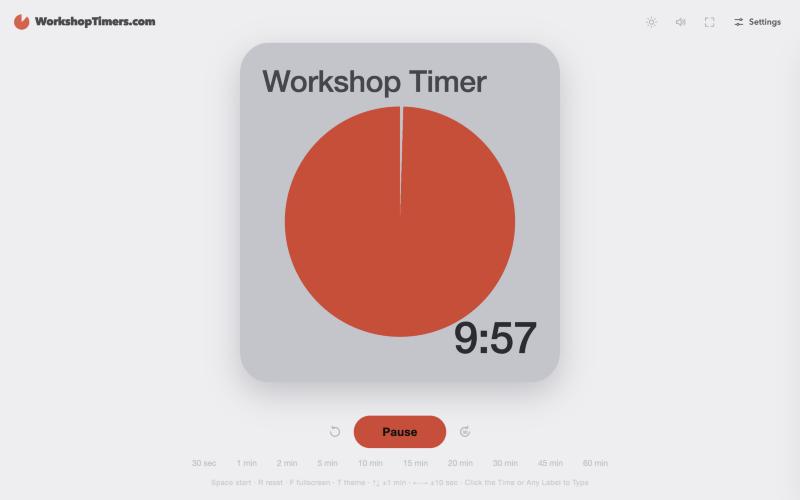
It starts with a big digit. Press the space bar and it runs, press F and it fills the screen, press T and the theme changes, and the arrow keys add or remove minutes and seconds, which is the whole control panel for a facilitator with one hand on a flipchart marker. There is no login, no ad and no pop-up asking if you would like to be reminded, and the page says it works offline, which is the property you value most at the exact moment the venue wifi dies.
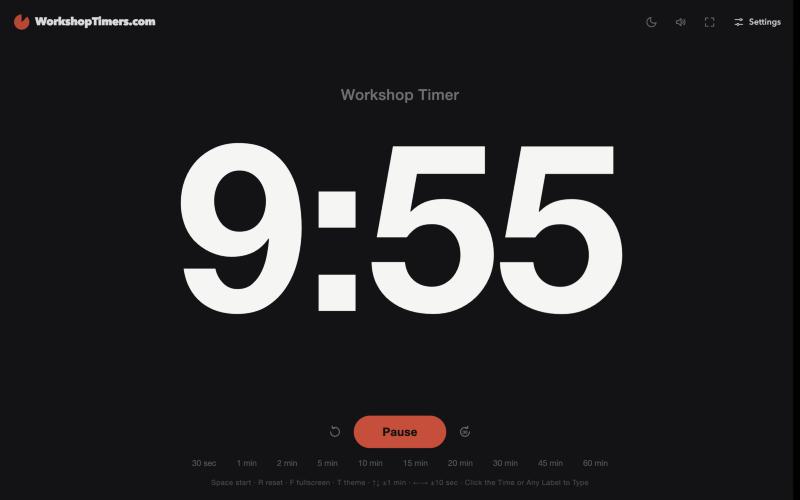
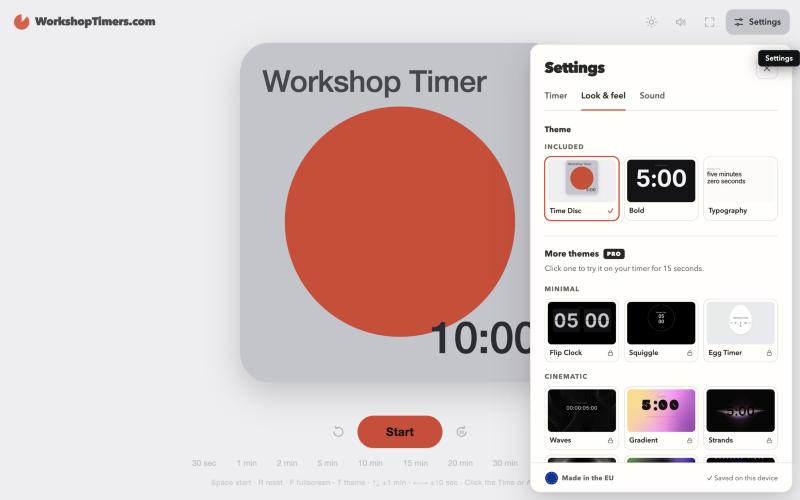
The Bold theme is the other free one, and it turns the screen into very large white numbers on black, which is the right choice for a back row and a tired projector. A third free theme, Typography, spells the time out in words, so the room is told it has nine minutes and fifty-four seconds in plain language, which we find calming and the pig finds hilarious.
Where it is not
It is one countdown. It has no remote control, so a producer cannot run the clock from the back of the hall while the speaker watches a second screen, and it has no agenda of five segments that moves along by itself. If that is your day, Stagetimer is better and we say so in the top ten, and for agendas there are tools such as Clock7's meeting timer that were built for it. We would rather you found the right clock than stayed on ours out of politeness.
What we would change to be found
Here is the part the pig dictated before lying down again, and it applies to any small tool with a one-word homepage. The title tag of workshoptimers.com is currently just its own name, which tells a search engine who it is and not what it does. A title and description that say fullscreen countdown timer for workshops, Zoom and projectors would do more work than anything else on the list, because it is free, it takes a minute, and it is the sentence a stranger reads in the results. After that come a few honest pages, each about one use, such as how to share the timer in Zoom, how to put it on a projector, and a timer for classrooms, each with its own title and a real paragraph written by a human who has run a workshop. Add a short FAQ and a little structured data describing it as a free web app, and the site is describing itself in the language its visitors use.
The brand name is also crowded. There are other things called Workshop Timer, a few of them on code sites and product directories, so a page that makes clear which one this is, and links to it by its full name, is worth having. And we should be careful to keep what we claim to what the tool does today, which is why the section above is so short on adjectives.
Questions people ask
What is the best fullscreen timer for a workshop?
The best one is the one the back row can read, so look for huge digits, a plain background, a fullscreen key and no pop-ups. Workshop Timers is built for exactly that, and the top ten we published alongside this post covers nine other good options.
Can I share a countdown timer on Zoom?
Yes. Open the timer in its own browser window, then choose Share screen in Zoom and pick that window instead of your whole desktop. Everyone sees the countdown, and your notes stay private.
Does Workshop Timers work offline?
Its page says it works offline, and it asks for no login and shows no ads. Your settings are saved on your own device.
Can I control the timer from another device?
Not with Workshop Timers. It is a single timer for someone who is in the room or sharing a screen. If you need a producer to run the clock from a laptop while a speaker watches a separate screen, Stagetimer is built for that and we say so in the top ten.
What does Workshop Timers cost?
The timer and two themes are free, and you can try the Pro themes for 15 seconds each. Pro is $9.99 once with no subscription, and a team licence for up to five people is $39, as listed on the site on 3 November 2026.
A note from the part of the company that is awake: this is our own product, so please read the praise with that in mind. The research is a look at what appeared in search results on 3 November 2026, and we had no keyword volume data, so we cannot say which of these searches are common. Every fact about other tools comes from their own websites, and prices are as listed that day. Workshop Timers has no connection to the tools we mention.
The tool is at WorkshopTimers.com, and the pig would like it noted that it recommended it before waking up. Read the top ten or go back to the blog.